
No-Code Trading Bots:How to Build, Test and Run One in Botico
A trading bot is your rules, followed without fail. This guide shows how Botico turns those rules into a bot: built with menus, tested on real market history, practiced with virtual money and only then trusted with real funds.
By Botico Research
Platform Guide • • 10 min read

Your Rules, Tested and Automated
Write the rule, prove it on real history, practice with virtual money, then let it trade on your own account.
Indicators
40+
Code Needed
None
What a no-code trading bot actually does
A trading bot is a set of instructions with a clock attached. You decide the conditions for buying and selling. The bot checks them on every new candle, day and night, and acts the moment they are met. It doesn't hesitate, chase losses or get bored, which is where a lot of manual trading goes wrong.
Funds have run strategies this way for decades, with engineers writing the code. In Botico, menus take the place of code: you pick indicators, set the numbers and choose how they compare, and the platform turns that into a bot you can test on past data, practice with virtual money and finally run on your own exchange account. You don't need to program, or years of trading behind you, to follow along.
Before we start: trading carries risk. This is a walkthrough of a tool, not financial advice, and nothing here promises a result.
Five steps, from idea to live bot
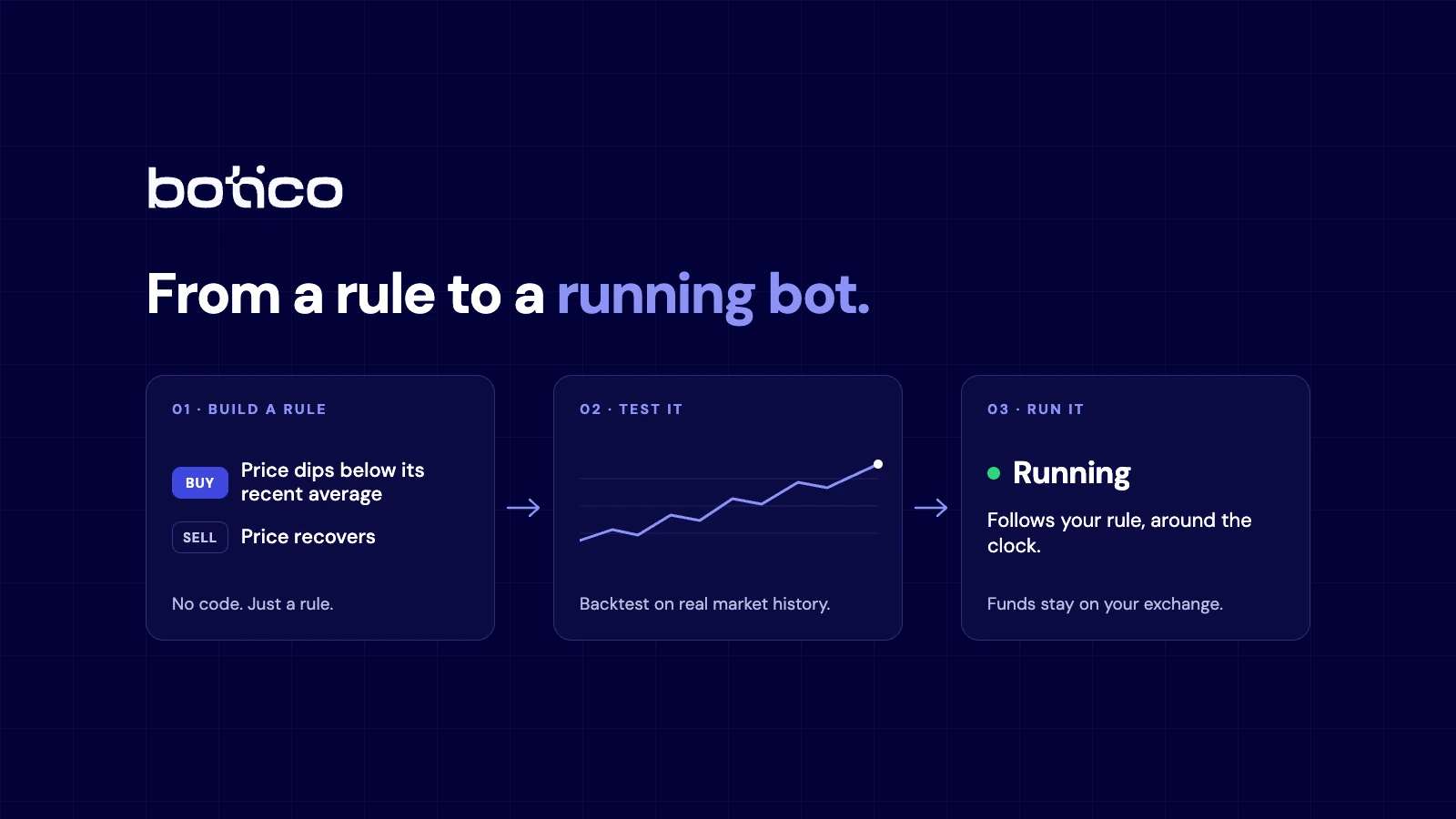
Every bot in Botico goes through the same five stages:
- Strategy: the conditions that trigger a buy or a sell, built by you or copied from a ready-made strategy.
- Risk: the size of each trade and the points where it takes profit or cuts a loss.
- Backtest: a replay of the bot on real market history, fees and slippage included.
- Virtual: the bot trading live prices with practice money.
- Connect:your own exchange account, linked by a key that can place trades but can't withdraw.
No bot reaches real money without passing the stages before it. And because the same measurements, from Sharpe ratio to max drawdown, follow it the whole way, you can spot the moment live results start to differ from the backtest.
Six words worth knowing
Bot
Software that places your buy and sell orders automatically, by your rules.
Indicator
A formula applied to past prices, such as an average or a momentum reading, that turns a chart into a number.
Stop-loss
A preset exit that closes a losing trade before the loss grows past your limit.
Take-profit
A preset exit that closes a winning trade once it reaches your target.
Backtest
A rerun of your strategy on historical prices, to see what it would have done.
Drawdown
The drop from a balance's peak to its lowest point after it.
Writing your rules with menus, not code
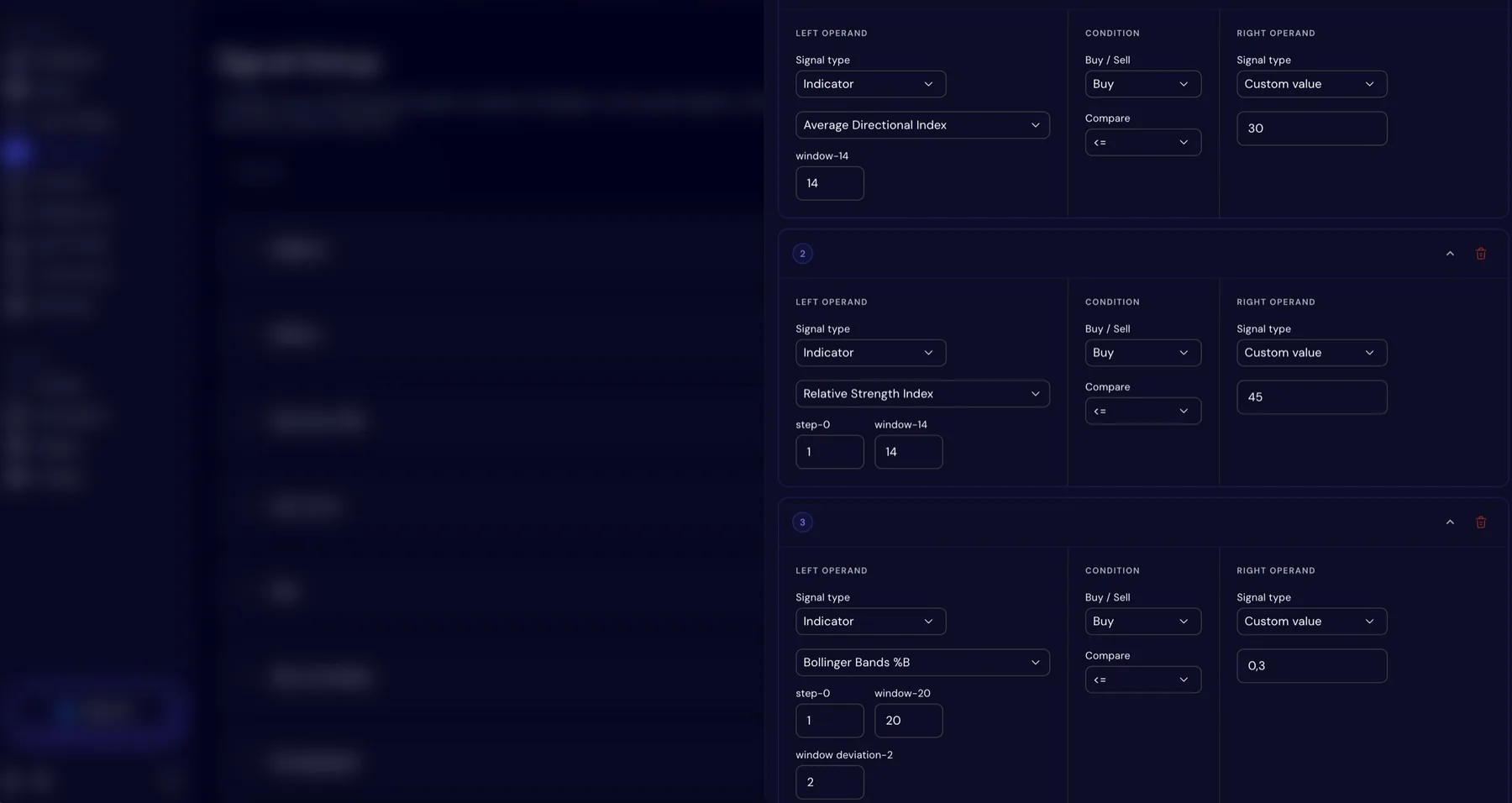
Every bot starts with signals: the conditions that say buy or sell. Botico's Signal Setup editor builds each one from two sides, an indicator, the price or a number you enter, joined by one of seven comparisons, from greater than and less than to crosses above and crosses below.
More than 40 indicators are available, grouped into moving averages (SMA, EMA, HMA and others), momentum (RSI, MACD, Stochastic, CCI), volatility (Bollinger Bands, Keltner Channel, ATR), volume (OBV, MFI) and trend strength (ADX, Aroon). Settings belong to each condition, so RSI over 14 periods and RSI over 7 periods count as two different signals.
Signals that wait for agreement
Requiring every condition to be true at once usually means a bot that almost never trades. Botico lets you set a minimum instead, one for buys and one for sells. With five buy conditions and a minimum of four, the bot buys only on candles where at least four agree, and waits through the rest.
Example · One candle, five buy conditions
- TrendPrice above its 50-period EMA: true
- RSIRSI(14) below 45: true
- MACDMACD line crosses above its signal line: true
- BandsBollinger Bands %B below 0.3: true
- VolumeVolume above its 20-period average: not true
4 of 5 agree · minimum to buy: 4
BuyNothing about the logic is hidden, because you wrote every part of it. Buy and sell conditions are independent, so you might enter on an RSI dip and exit on a moving average crossover. If you already have a strategy saved as a JSON file, import it rather than rebuilding it by hand. New to RSI? Our guide to RSI and moving averages builds three strategies around it.
Turning rules into a bot
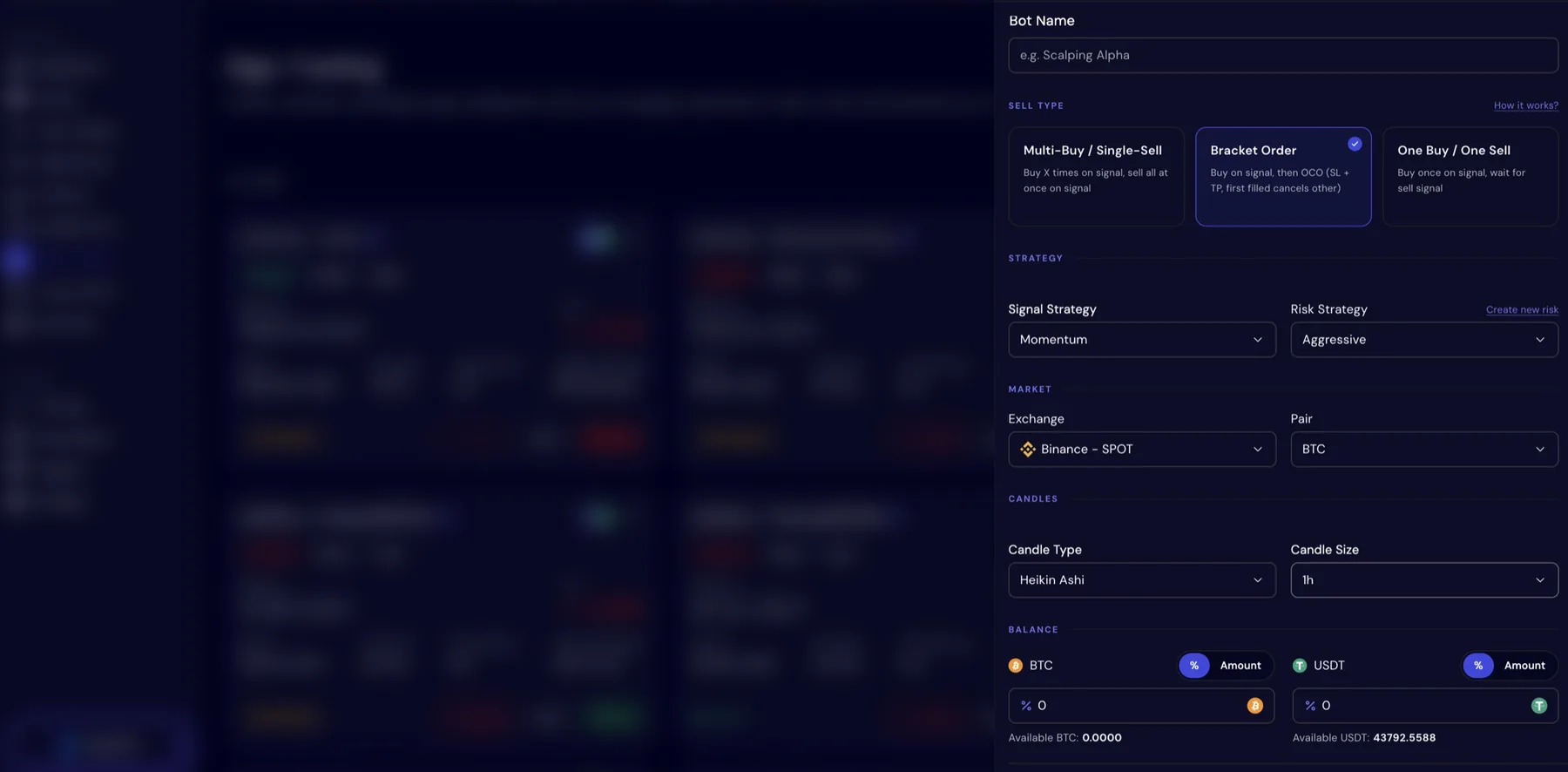
Creating a bot takes one form. Give it a name, choose the exchange and the pair (BTC against USDT, for example), set the candle type and size, then attach a signal strategy and, optionally, a risk profile. The starting balance can be cash, a coin you already own or both, so you can trade with coins you hold instead of converting them to cash first.
Pick how the bot exits
01 · Bracket Order
One buy per signal, with a take-profit and a stop-loss placed together straight away. The first to fill closes the position and cancels the other, so the worst case is set before the trade begins.
02 · One Buy One Sell
One entry on a buy signal, one exit when your sell conditions agree. Each trade stands on its own, which keeps results simple to read.
03 · Multi Buy Single Sell
Adds to the position each time the buy signal repeats, then closes everything in one sell: a way to build a position gradually instead of buying all at once.
Exits change results more than most people expect, so test the same strategy with each of them. The exit types page goes deeper.
Setting your limits
You can skip risk settings, but experienced traders rarely do: how much goes into each trade and where you get out often matter more than where you get in. Risk profiles are created inside the bot form, saved once and reused on any bot. Each one covers three things:
Position sizing
The size of each trade: a fixed share of your balance, or a size worked out by the Kelly Criterion, a formula for sizing positions.
Stop-loss
The exit for a trade that goes against you, set as a percentage or from ATR, which measures how far the price usually moves.
Take-profit
The exit for a trade that works, set as a percentage or as a multiple of the risk you took.
Two extra safeguards sit on top: a trailing stop-loss that moves up with the price to protect a gain, and a drawdown limit.
The drawdown limit: a brake, not an off switch
Losing streaks happen to every strategy. A drawdown limit sets how much of a slide you will tolerate. Once the bot is down by more than that, it stops opening new positions, but it keeps running and keeps managing its exits. When it climbs back, it starts buying again by itself. Nothing gets cancelled along the way.
Illustration · Drawdown limit at 10%
Testing on real history
Before a bot touches real money, run it through history. A backtest replays your strategy candle by candle over a period you choose, trading exactly as the live bot would and charging the same fees and slippage. If an idea fails here, it cost you nothing to find out.
The results are grouped around four questions: did it make money (returns), how rough was the ride (risk), how does it trade (trade stats) and where did the money go (P&L detail). Between them you get total return, max drawdown, Sharpe and Sortino ratios, win rate, fees, slippage and every simulated trade plotted on the chart. Run several versions and compare them side by side. On futures pairs you can test leverage anywhere from 1x to 125x and see how far each setting sits from liquidation.
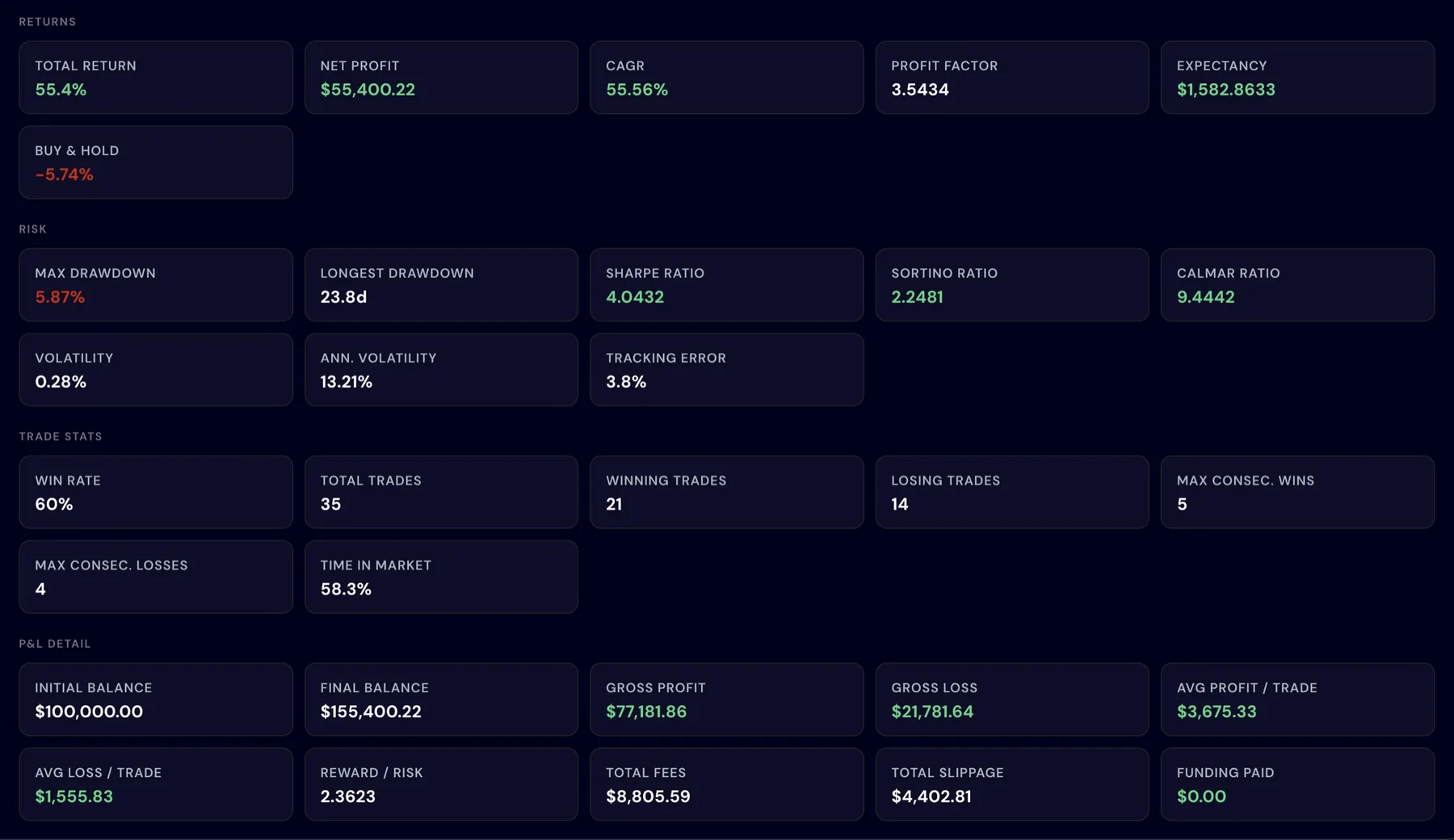
A good backtest earns a strategy a closer look, not your trust. Markets change, and what worked on last year's data can stop working. Use backtests to throw out weak ideas rather than to prove strong ones.
Two habits help: look at max drawdown before profit, and check the strategy on a stretch of history you didn't use to pick its settings. Every metric is explained on the backtesting page.
Practice money first, real money later
Bots run in one of two modes, and a new bot should always start in the first. Virtual orders are logged just like real ones, so you can line them up against the backtest.
Virtual (paper trading)
Real market prices, practice money. You see how the bot behaves live without putting anything at stake: the only mode with no financial risk.
Live
Real market prices and real funds, on your own exchange account, with the same strategy and risk settings you tested.
Every decision, on the record
Each bot gets its own page with three views: an overview of its settings and performance, a full breakdown of its metrics (return, profit and loss, Sharpe and Sortino ratios, win rate, profit factor and fees) and a list of its trades. Open any trade and you see each condition it checked, whether it passed and how many were needed.
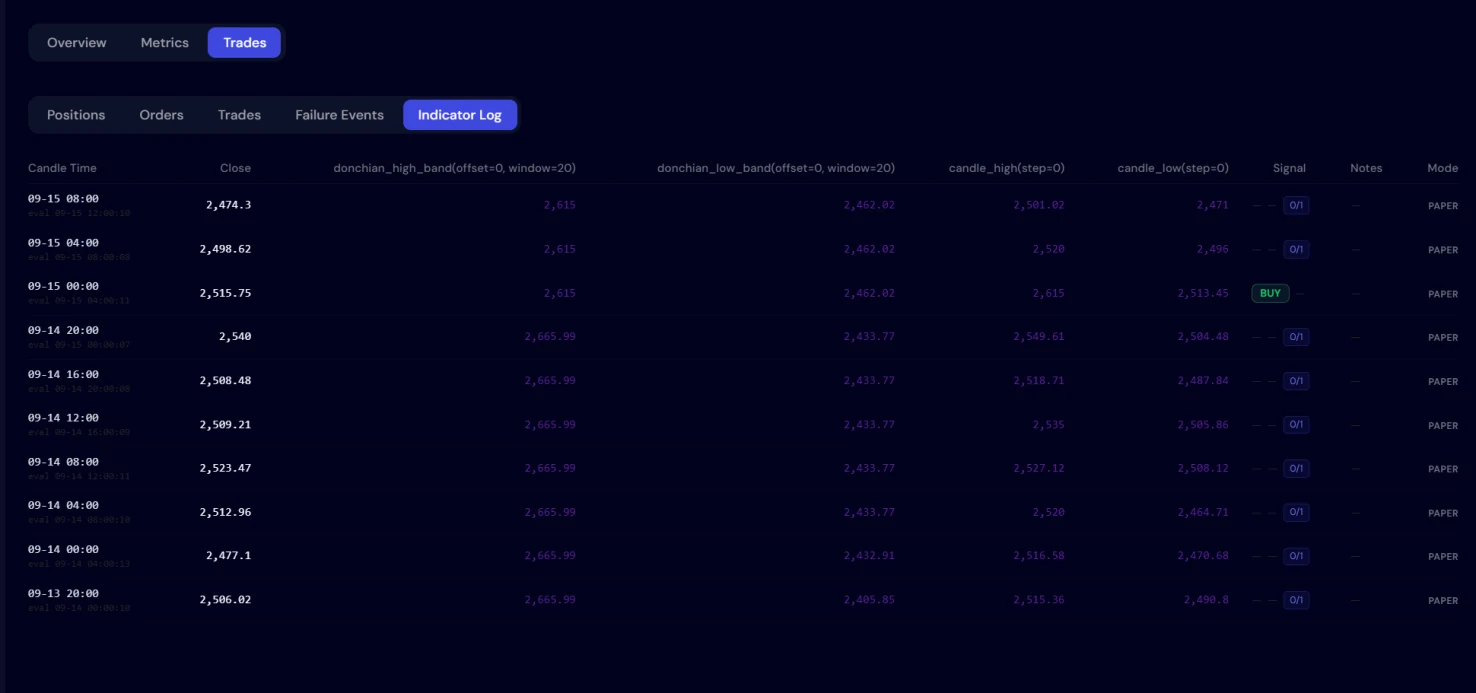
The Indicator Log records even more. For every candle it keeps the values the bot read, how many conditions agreed and whether it traded, including all the times it chose to wait. Most signal services ask you to take their calls on faith; here you can check every one.
The dashboard
Open Botico and the dashboard sums up the whole account in one place, so you can see where things stand without clicking through every bot.
Balances by exchange
What you hold on each connected exchange.
Market sentiment
The mood of the market at a glance.
Bots and strategies
How many of each you have.
Open orders
Every order still waiting to fill.
Most profitable bots
The bots doing best for you.
History, reports and alerts
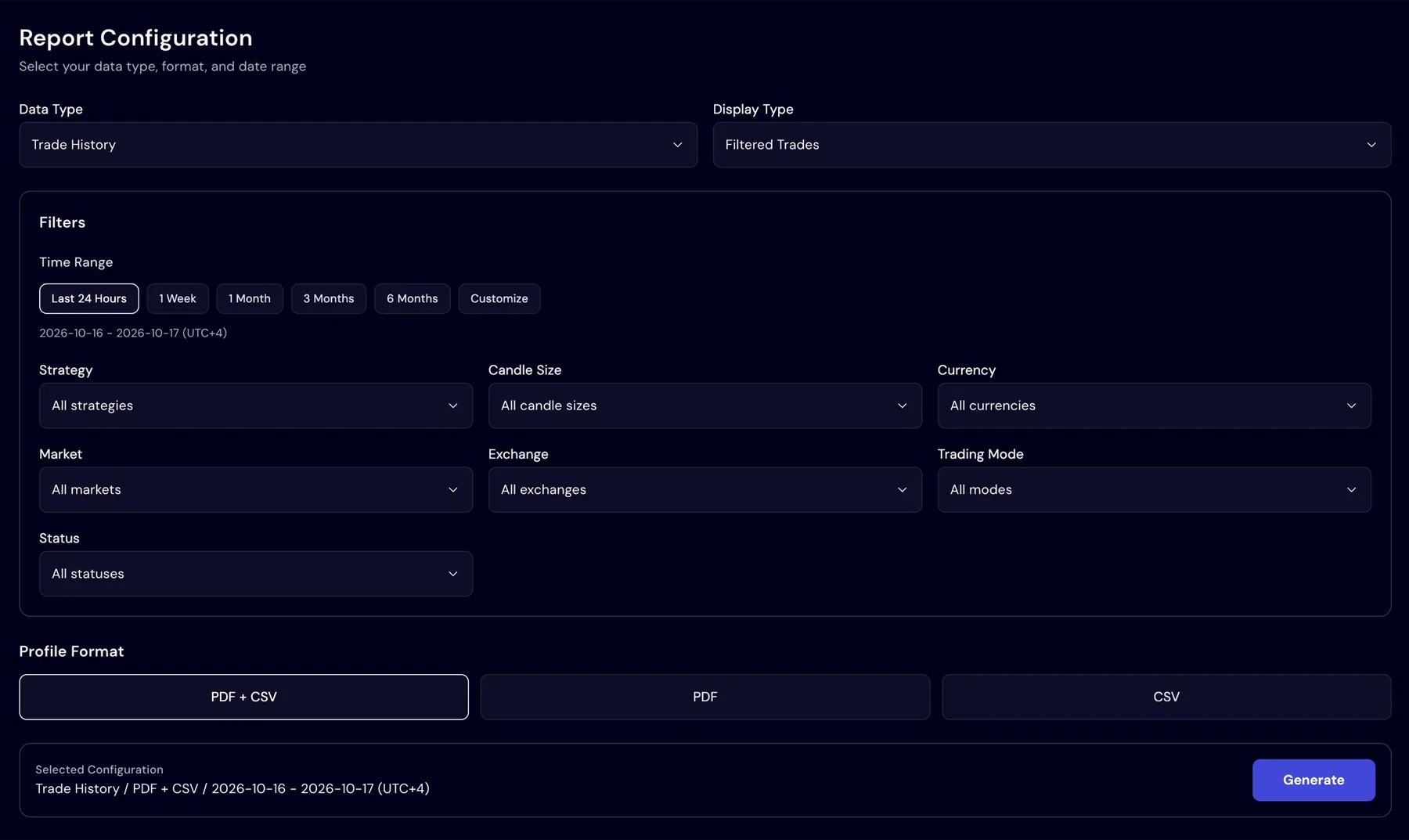
Trade History lists every buy, sell and open order, virtual and live, and filters by bot, currency or status. Reports export a backtest or your trade history as PDF, CSV or both, narrowed by market, mode, status or dates, which is useful for bookkeeping and taxes. Alerts reach you in the app or on Telegram whenever a trade fills, a bot stops or a backtest finishes.
Shortcuts: copy trading and the Library
Not every trader wants to design strategies. With copy trading you pick a published leader bot, review its results, then follow it. Following creates a bot of your own that copies the leader's buys and sells as they happen. You decide whether it uses virtual or real money, how much balance it gets, a cap per trade and an optional daily cap. It only starts when you press start, and it exits when the leader exits.
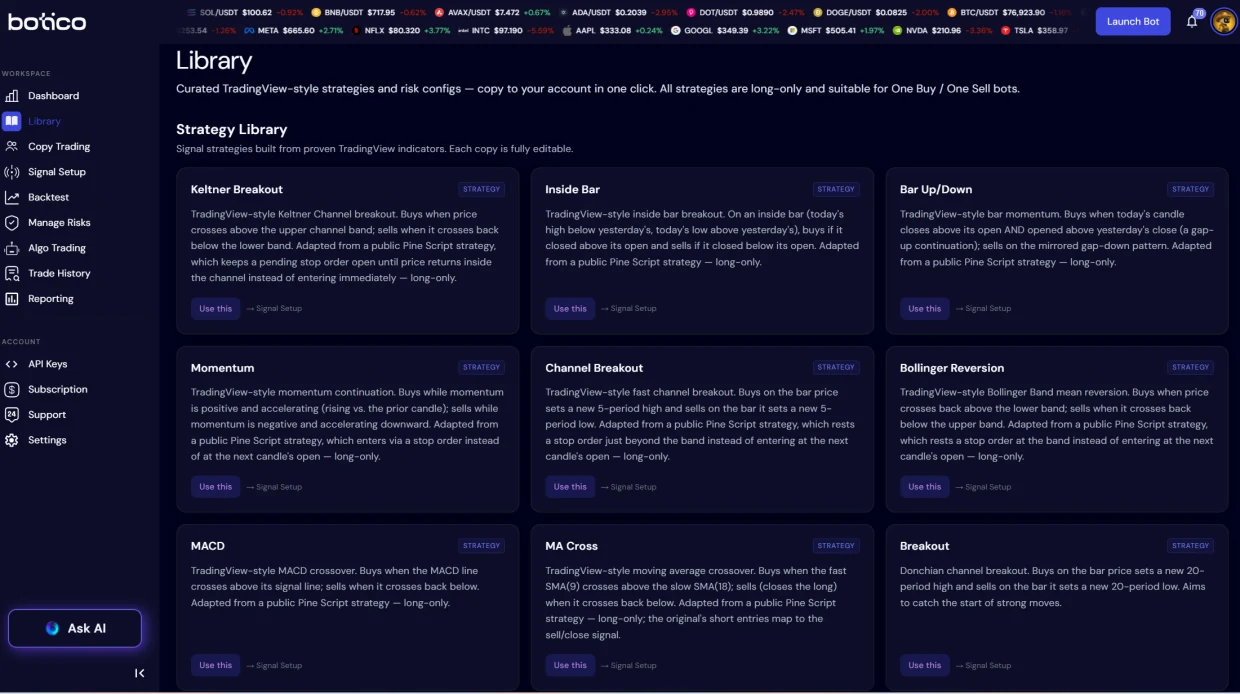
The Library is the other head start: ready-made strategies built on well-known indicators, along with risk profiles. One click copies a strategy into your account, where every condition and setting is yours to change. Tweaking something that already works is one of the quickest ways to learn. Library strategies are long-only: they buy, then sell to close.
Your AI copilot
Inside the app there's an AI copilot that knows your account: your strategies, backtests and trades. Ask it what a strategy actually does, whether a backtest result is believable or why a trade did or didn't happen, and it answers in plain language. It flags weak spots and suggests improvements, and it changes something only after you say yes. Open it from any screen with Ask AI.
Example · Asking the copilot
You: Can you review my breakout strategy?
CopilotSure. It buys when the price closes above the upper band and sells below the lower one. One thing to watch: a single condition means a quick spike can trigger it. A second confirmation would filter out false breakouts.
You: Why didn't my bot buy this morning?
CopilotThe price broke out, but your new confirmation didn't agree, so the bot waited. That's the filter doing its job. You can see every check candle by candle in the Indicator Log.
The copilot reviews; you decide. It doesn't place trades or manage money by itself, and its suggestions aren't financial advice.
Your funds stay on your exchange
Botico never takes custody of your money. Your bots trade through an API key you generate on your own exchange account. That key can place trades but can't withdraw, and deleting it takes one click, so your funds sit with your exchange at all times. The bots themselves run on Botico's servers around the clock, so they keep going when your computer is off.
The account has its own protection as well. Two-factor authentication guards the sign-in and a sessions list shows every device with its approximate location. Telegram alerts come with notification controls you can set one by one.
Snapshot · Where your money stays
Delete the key on your exchange and the bot can no longer trade on that account.
Markets and exchanges
- Exchanges: Binance, Bybit, KuCoin and many more exchanges to come. KuCoin links in one click, with Botico creating the API key for you.
- Markets: crypto on spot and futures, plus backtesting on tokenized stock pairs.
Is Botico right for you?
It fits traders who want their rules automated without learning to code, people who would rather test an idea than trust it and anyone who can't sit in front of charts all day. What it won't do is remove risk or hand you guaranteed returns. What it will do is make your strategy explicit, testable and transparent, from the first backtest to the last live trade.
Questions people ask
What is Botico, in one sentence?
Botico is a no-code trading platform: you build or copy a strategy, test it on real history and virtual money, then run it as a bot on your own exchange account.
Do I have to know how to code?
No. Everything is built with menus, fields and buttons. There is no programming or scripting language anywhere.
Who holds my money?
You do, through your exchange. Bots trade with an API key that can't withdraw, so Botico never touches your funds.
Can I test without risking real money?
Yes. Backtest on real history with fees and slippage counted, then run the bot on live prices with virtual money. Real funds only come in when you decide to connect them.
Is there a free plan?
Yes. The Starter plan is free, so you can build strategies, backtest them and run a bot without paying anything. When you want more bots running at once, longer price history or the advanced risk filters, the Advanced and Professional plans add them, and you can cancel anytime. See pricing for the details.
Which exchanges and markets are supported?
Binance, Bybit, KuCoin and many more exchanges to come, with one-click setup on KuCoin. Bots trade crypto on spot and futures markets, and tokenized stock pairs can be backtested too.
Will it make me money?
There is no promise of that. Trading always carries risk. Botico gives you the tools to build, test and run strategies, not financial advice.
Trading crypto, tokenized stocks and leveraged products carries significant risk, including the loss of money. This article is general information, not financial or investment advice. Past results, backtested ones included, don't guarantee future performance.
Next Step
Start with one rule.
Open Botico, copy a Library strategy or build your own in the no-code signal builder, backtest it, then let it run on practice money before any real funds are involved.
First step
One rule
Then
A backtest
On this page
• Five steps, from idea to live bot
• Writing your rules
• Turning rules into a bot
• Setting your limits
• Testing on real history
• Practice money first
• Every decision, on the record
• Copy trading and the Library
• Your AI copilot
• Your funds stay on your exchange
• Questions people ask
Key takeaways
- Rules are built from 40+ indicators in a visual editor, and the bot waits until as many of them agree as you decide.
- Every strategy can be backtested with fees and slippage, then run on practice money before real funds are involved.
- Your money never leaves your exchange: bots trade through a key that can't withdraw.
Signal
The fastest way to learn is to change something that already works: copy a Library strategy, backtest it, then adjust one condition at a time and compare the runs.
Evidence first. Execution second.